Fah Swe Smart Parking — Multi-Level Parking Management
0views
0 views · lifetime recorded total
Multi-Level Parking Management Software
Review product scopePrefilled development requestClient portal
Price
$600.00
Package price · existing full-payment or loan options after review
Fah Swe multilevel parking software with entry/exit desks, floors and bays, vehicle tokens, user records, timing, fees, discounts, receipts and reports. Full payment and eligible loan/installment options are available after scope review and approval. Specify reservations, mobile/SMS and compatible device integrations through the existing client portal.
Fah Swe Smart Parking is a ready-to-order development offer for a clearer multilevel parking operation. Bring the agreed entry desk, exit desk, floor layout, parking tokens, customer records, timing, charges and management reports into a coordinated system. Fah Swe is a software company in Bangladesh serving clients in Bangladesh and worldwide.
Full payment and loan/installment options
Full payment and eligible loan/installment options are available through the existing Fah Swe order process after scope review and approval. Loan eligibility, advance amounts, terms, KYC, signed agreements and payment verification follow the existing quotation and client-portal rules. Your displayed price follows the portal currency selection; issued invoices keep their confirmed amount and currency.
Built around your parking facility
Start with the number of floors, bay labels, vehicle types, opening hours and how your team handles arrival and departure. The software is prepared against the approved requirements. A shopping mall, office, hospital, residential site or commercial car park may need a different layout, tariff and operator structure.
From arrival to a completed stay
Register the vehicle, assign a suitable space and issue a parking token. Follow the active stay and recorded time, then open the same token at the exit desk. Review the bill and any permitted discount, record the real payment, provide the agreed receipt and close the visit. Keep customer/vehicle search, space status and reports connected to that workflow.
Driver-facing planning and connected options
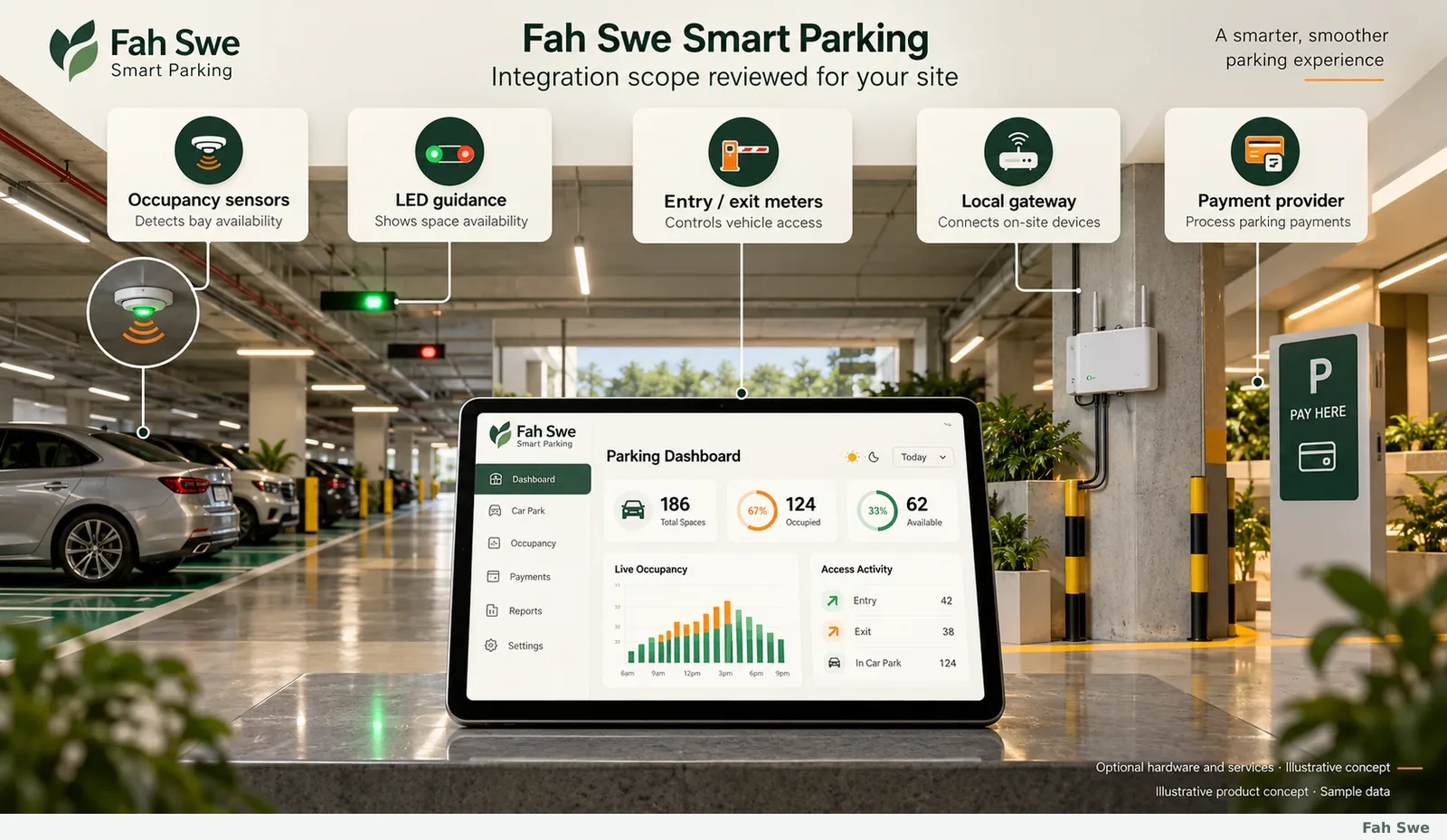
Reservations, location search, mobile views and SMS can be specified alongside the operator workflow. Compatible sensors, indicators, direction boards, meters and payment providers use a separate reviewed integration plan. Hardware, site installation, messaging charges, provider approvals and hosting costs are confirmed during review. Automated driving, steering and braking are not represented as a standard software package.
How to order through Fah Swe
Use Order development to open the existing New Development request with this product's details. Add your facility information and any diagrams or requirements. You can save an account-protected device draft and submit later. Complete the company details requested by the portal before submission.
Fah Swe reviews the request, confirms or corrects the scope and provides the agreed quotation. Approve and lock the agreed scope, then use the existing full-payment or loan/installment options where eligible. Payment evidence goes through the normal verification process; a submitted screenshot is not automatically a received payment. Project work, delivery and support follow the existing client portal rules.
Deployment and handover
Tell Fah Swe whether you need a web dashboard, an on-site desktop setup, mobile access or a combination. Share domain/hosting requirements or the proposed on-site environment. Do not place passwords, server secrets or provider keys in a public brief. Any secure setup access is arranged during fulfillment. Delivery timing, training, exports and the handover checklist are agreed after the requirements and integrations are reviewed.
About the product images
Every image on this page is an original Fah Swe illustrative product concept with sample data. The feature heading, image, explanation, steps and benefit describe the same workflow. They are not screenshots of a customer's live deployment or a copy of another developer's software.
More from Fah Swe
Explore our other digital products at https://fahswe.com/products, completed work at https://fahswe.com/portfolio, and company/contact information at https://fahswe.com/contact. The existing mobile parking product remains a separate offer at https://fahswe.com/products/parking-management-software.
What your purchase includes
Entry and exit operator login
Customer registration and registered-user records
Operator accounts and agreed permissions
Vehicle records and advanced search filters
Multilevel floors and individually identified bays
Vehicle categories, bay dimensions and clearance notes
Available, occupied, accessible and reserved-space status
Vehicle entry and unique token generation
Printed or digital parking-pass workflow
Active parking stays and elapsed-time records
Exit time and completed-visit history
Duration/category-based tariff configuration
Separate discounts, bills, payments and receipts
Occupancy, collections and management reporting
Agreed export and print formats
Customer parking search and reservation scope
Mobile-friendly operator/customer screens
SMS event notifications with configured provider
Reviewed sensors, LED guidance and meter connections
Existing Fah Swe quotation, full payment/eligible loan and manual handover
INSIDE THE SOFTWARE
Software screenshots & workflow guide
Open any image to inspect the full screen. Each step explains its use and business benefit.
01
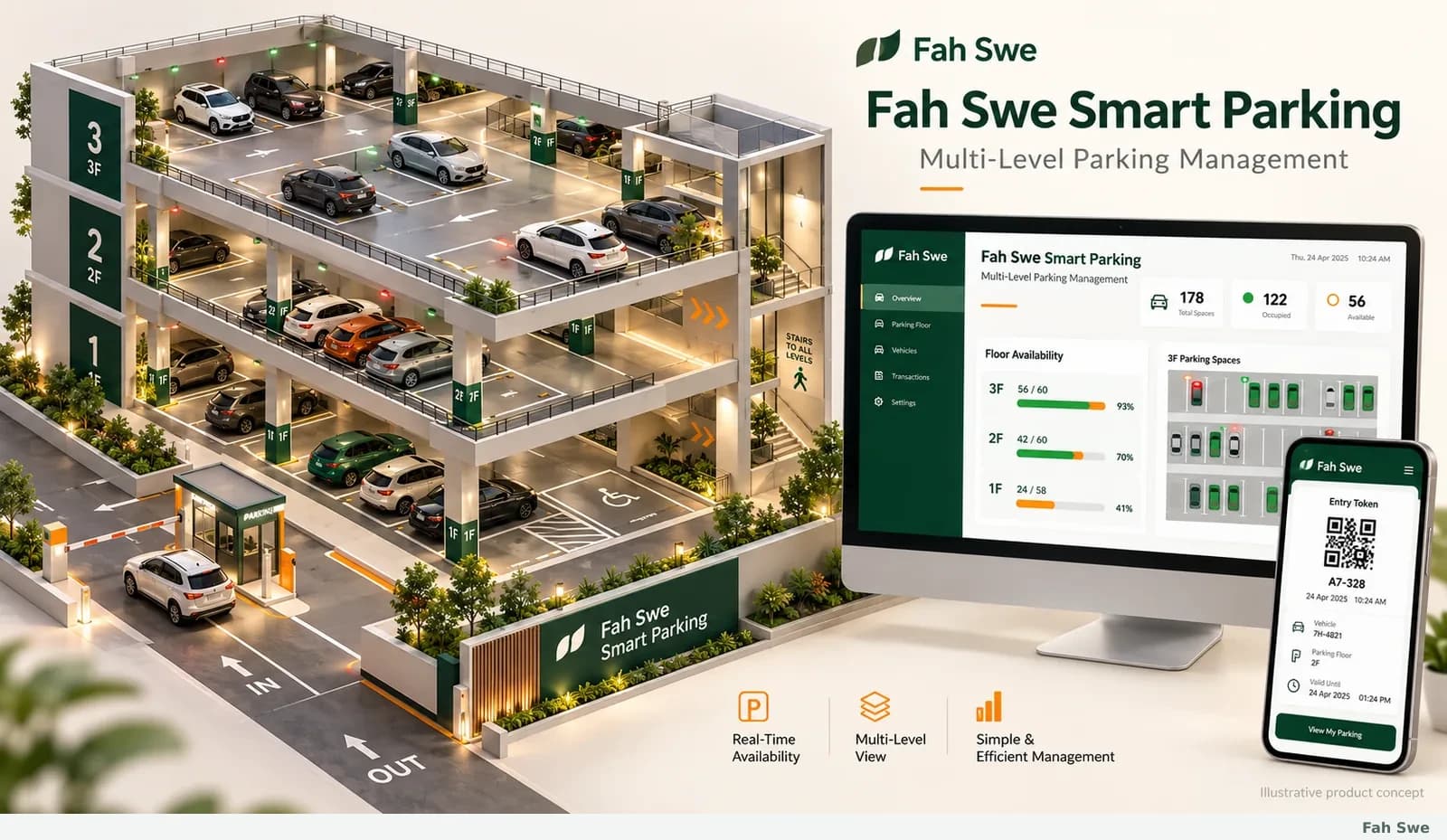
A connected workspace for parking operations
Give your parking team one organized place to follow arrivals, spaces, stays and departures. Fah Swe Smart Parking is a development offer for multilevel facilities, commercial car parks, malls, offices, hospitals and residential sites. Configure the software around your actual floors, operating rules and team. The visuals explain an original product concept using sample data; Fah Swe reviews the required modules and prepares the agreed system through the existing project and handover process.
How to use this screen
Describe your facility and daily workflow.
Confirm the required software modules with Fah Swe.
Follow review, setup and delivery in your client portal.
Business benefit
Keep the agreed parking workflow clear from the first requirement to handover.
02
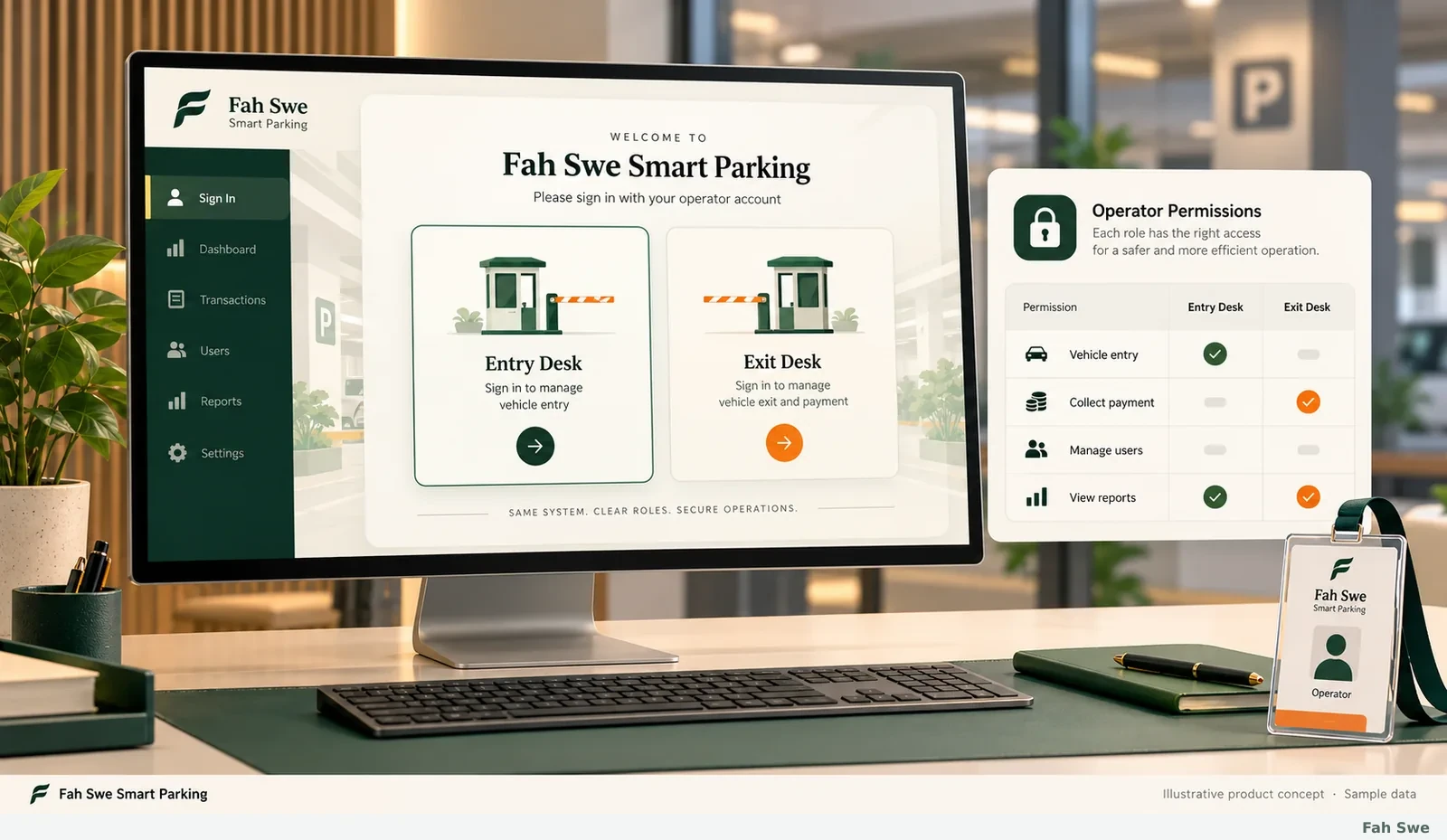
Entry and exit desks with controlled access
Give entry operators and exit operators a clear starting screen and the actions relevant to their work. An administrator can organize operator accounts and agreed permissions for vehicle entry, checkout, user records and reports. Each staff member uses individual credentials rather than a shared public login. Account registration, sign-in and role assignment are included in the scope discussion so the owner can decide who handles each part of the parking operation.
How to use this screen
Create the required operator accounts.
Assign entry, exit or administrative responsibilities.
Sign in and work within the agreed access level.
Business benefit
Reduce confusion between vehicle admission, payment handling and administration.
03
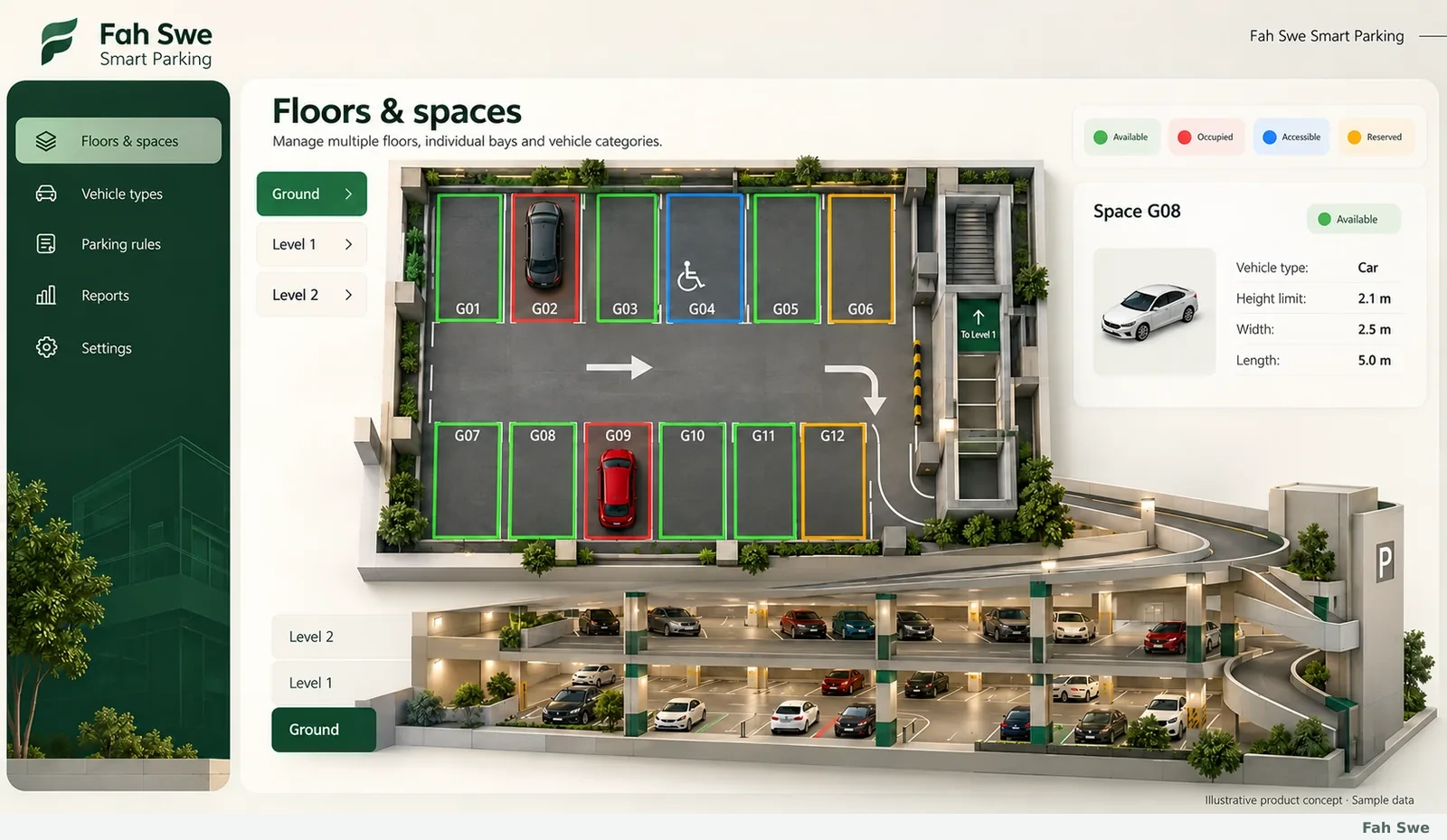
Floors, bays and vehicle categories
Organize a facility into named floors and individually identified parking bays. Store the appropriate vehicle category, length, width, height limit and relevant surface or access notes. Use a clear status legend for available, occupied, accessible and reserved spaces; reserved or accessible designations remain distinct from the current occupied state. Cars, motorcycles and other agreed vehicle classes can follow the site layout. The bay plan and physical labels are confirmed during setup.
How to use this screen
Add floors and identify each parking bay.
Record vehicle limits and special-space designations.
Review the layout before opening it to operators.
Business benefit
Help the team assign a suitable space instead of relying on an unstructured count.
04
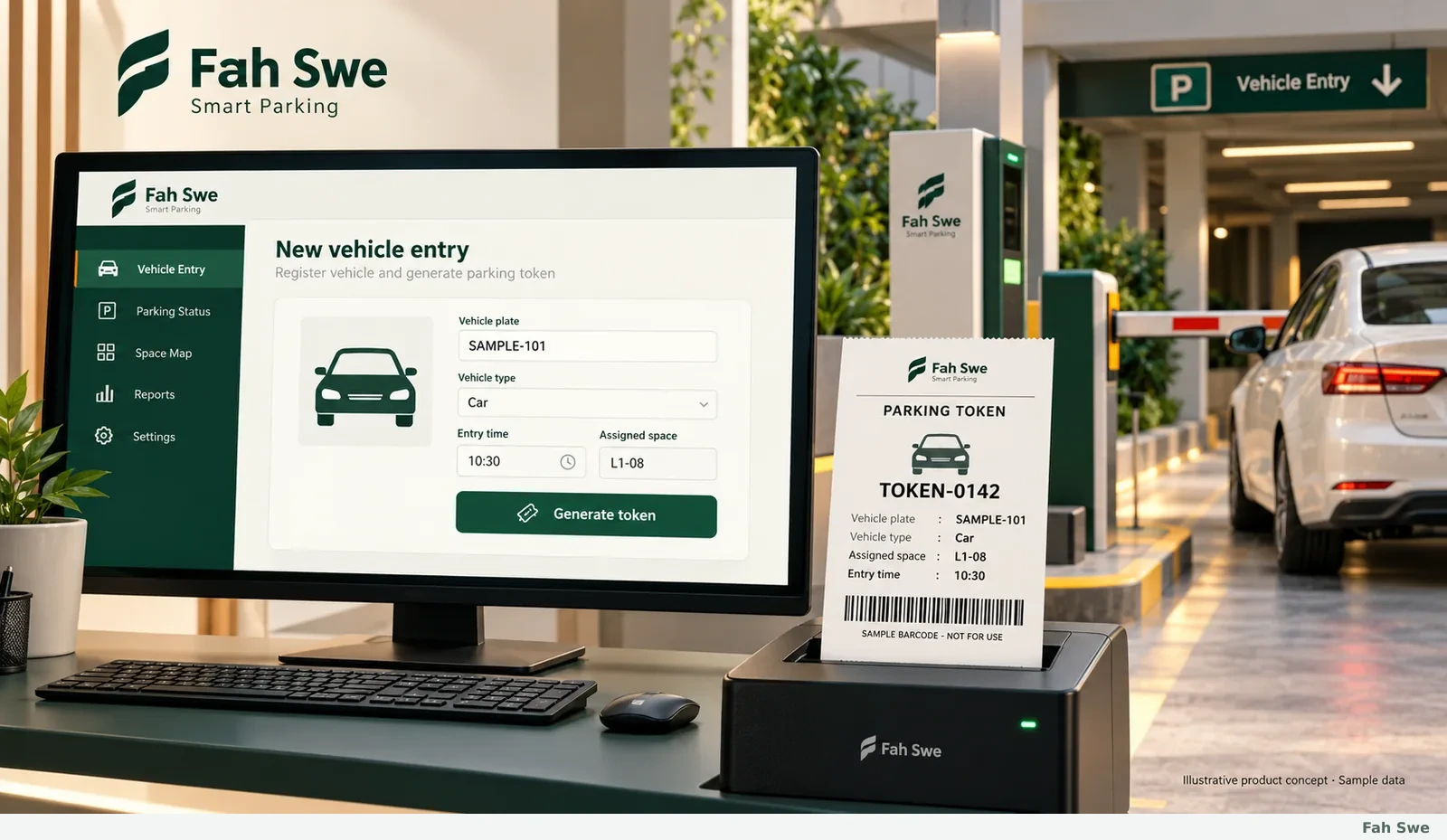
Vehicle entry and parking-token generation
Record the vehicle identifier, vehicle type, arrival time and selected space when a vehicle enters. Generate a unique parking token that connects the visit to its assigned bay and later checkout. The entry desk can review details before issuing a printed or digital pass. Printer choice, ticket size and any barcode or scanning requirement are confirmed for the actual equipment. Manual plate entry remains a valid workflow; automated recognition is a separate integration requirement.
How to use this screen
Enter the vehicle and arrival details.
Choose a suitable bay and confirm the record.
Issue the token for the customer and exit desk.
Business benefit
Connect admission, space assignment and payment to one identifiable visit.
05
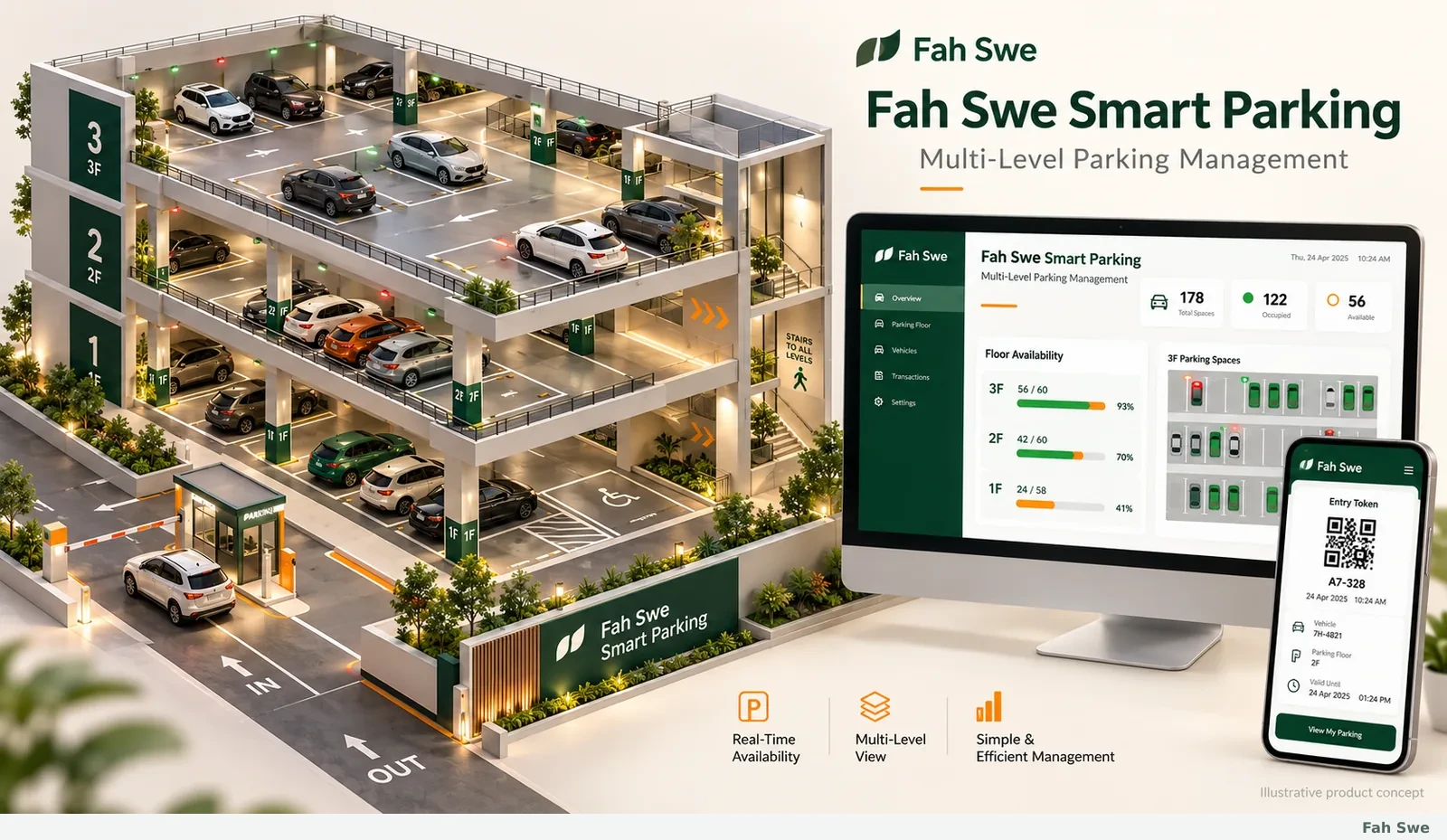
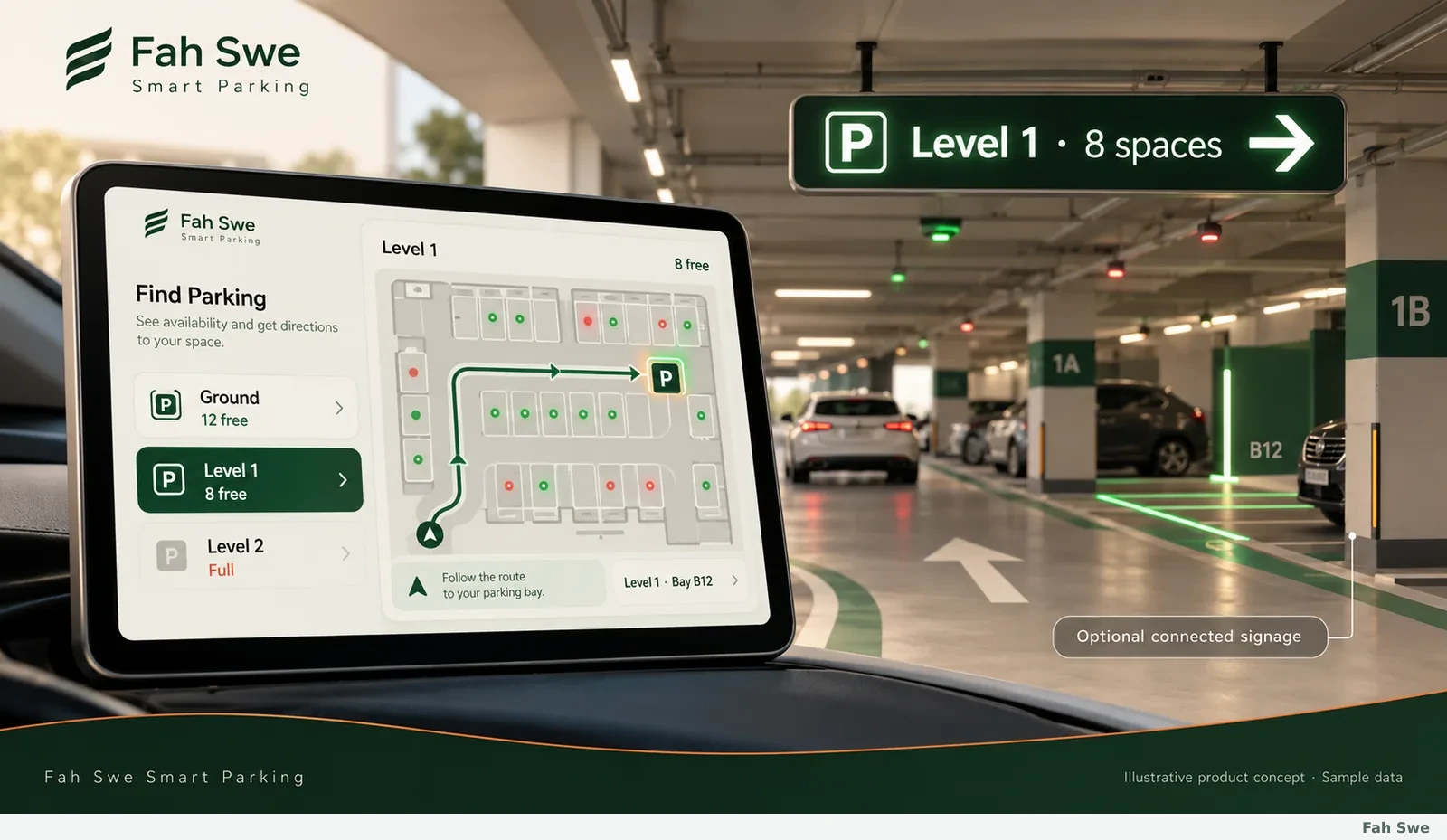
Space availability and parking guidance
Show which floors have usable spaces and help the entry desk guide a driver to an assigned bay. Availability follows the chosen operating model: staff updates, validated connected-device events or an agreed combination. A visible status and update time help operators understand the information they are using. Entrance displays, aisle direction signs and green/red indicators can be connected where compatible equipment is specified; the software offer does not silently include physical signage.
How to use this screen
Review current floor availability.
Select the appropriate bay and direction.
Update the space when the vehicle arrives or leaves.
Business benefit
Give staff and drivers a clearer route through the facility.
06
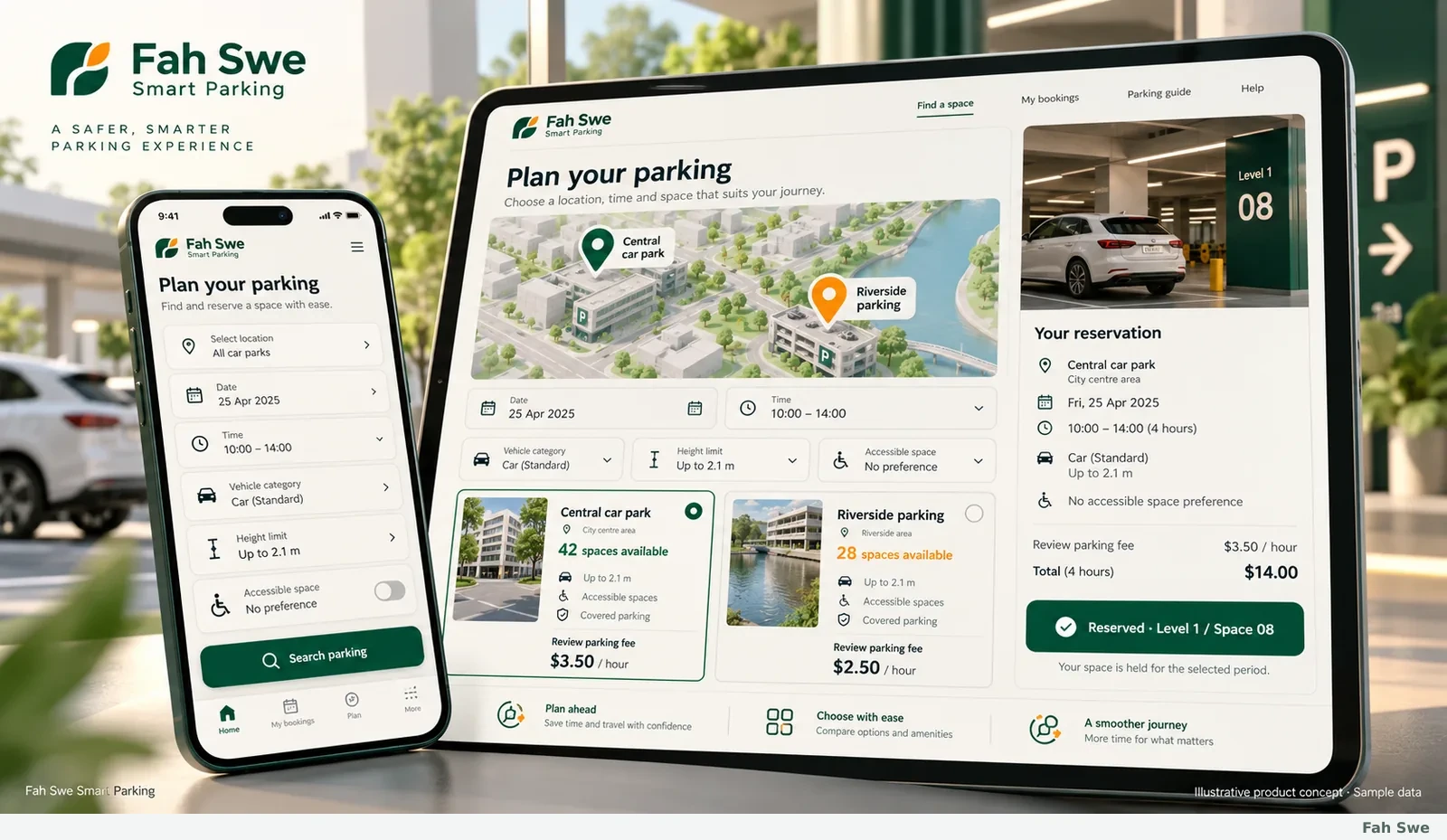
Parking discovery and advance reservations
Plan a customer-facing search and reservation flow for the locations included in your deployment. Drivers can review a facility, available vehicle categories, clearance notes, space availability and published parking fees before choosing a time. Reservation rules define how a space is held, released or marked unavailable. Location-based suggestions and comparisons across several parking providers require the relevant location data and provider connections. These choices are specified before implementation, rather than assumed from a picture.
How to use this screen
Choose the location, vehicle category and parking time.
Check the displayed availability and conditions.
Confirm the reservation using the agreed booking rules.
Business benefit
Let the customer understand a parking option before arrival.
07
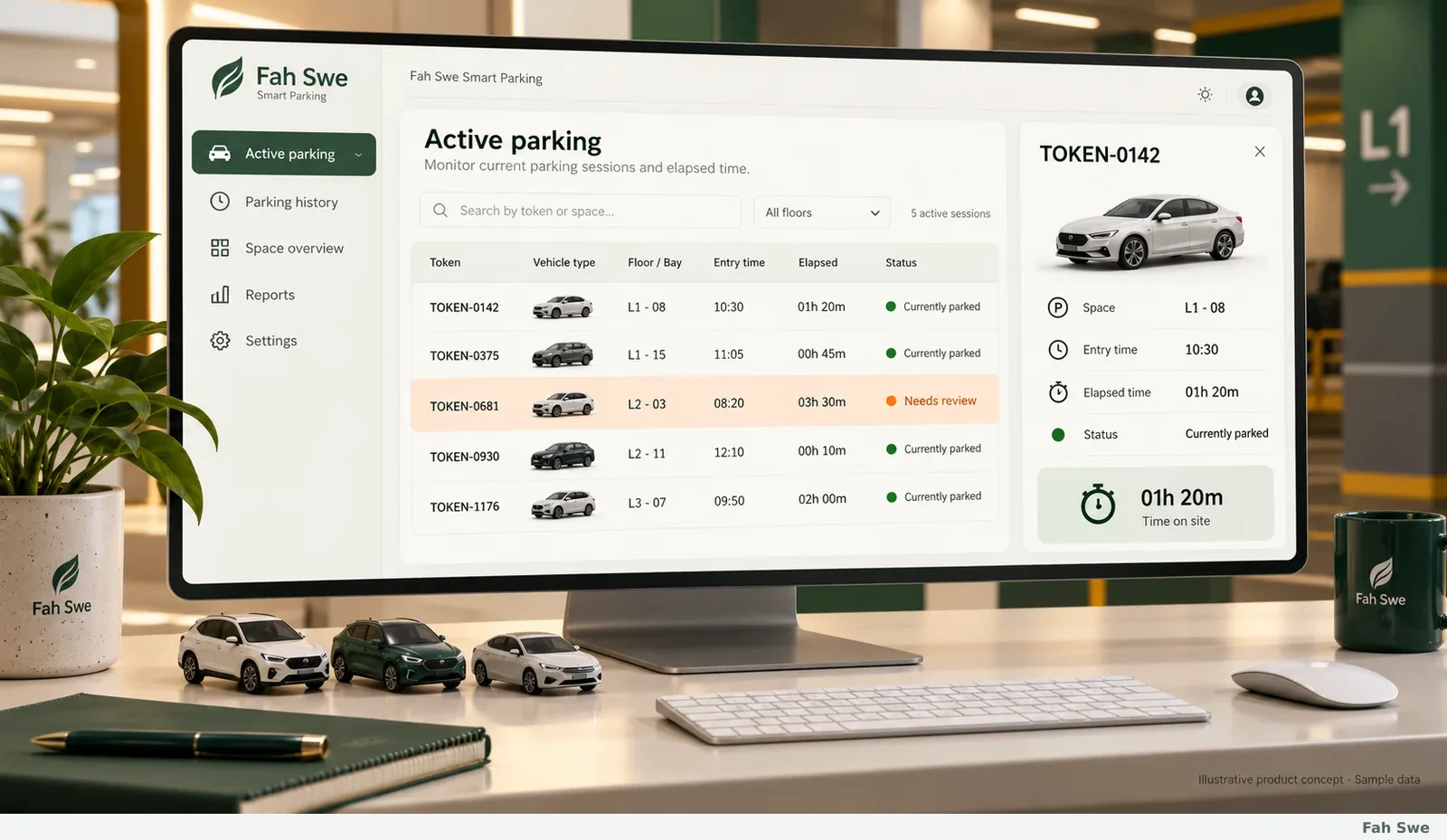
Active stays, timing and exception follow-up
Follow the current parked vehicles from a searchable active-stay list. Each record keeps its token, space, entry time, elapsed duration and operational status together. At exit, the same visit receives an exit time rather than becoming an unrelated record. Staff can mark a stay for review when a token, placement or other condition needs attention. An exception flag supports an operator decision; it does not automatically create a legal penalty or prove a vehicle has violated a rule.
How to use this screen
Find a stay by token, vehicle, floor or bay.
Review the entry time and current duration.
Resolve any exception before completing departure.
Business benefit
Keep vehicle status and time records connected throughout the stay.
08
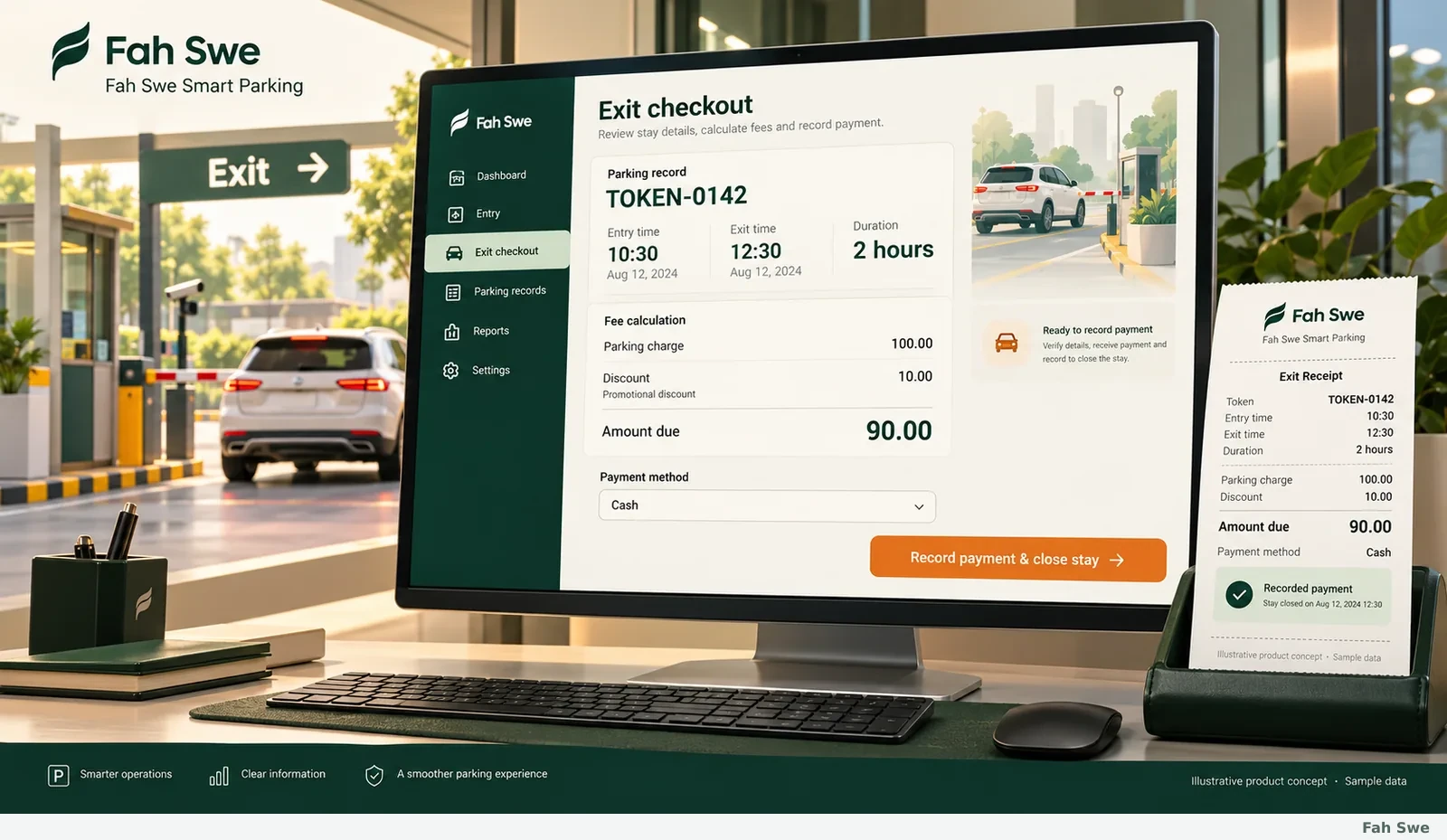
Parking fees, discounts, receipts and exit checkout
Configure the agreed parking tariff and review the fee against the recorded duration and vehicle category. Show the original charge, any allowed discount, final bill and recorded payment separately. An exit operator can verify a token, record the real collection, provide a receipt and close the stay. Cash and other manual records can be used without pretending a bank transfer has been verified automatically. Online payment-provider connections, meter links and special merchant-validation schemes are reviewed integrations.
How to use this screen
Open the token and review entry/exit times.
Check the charge and any authorized discount.
Record the received amount, issue a receipt and close the stay.
Business benefit
Make the difference between the bill, a discount and money collected easy to understand.
09
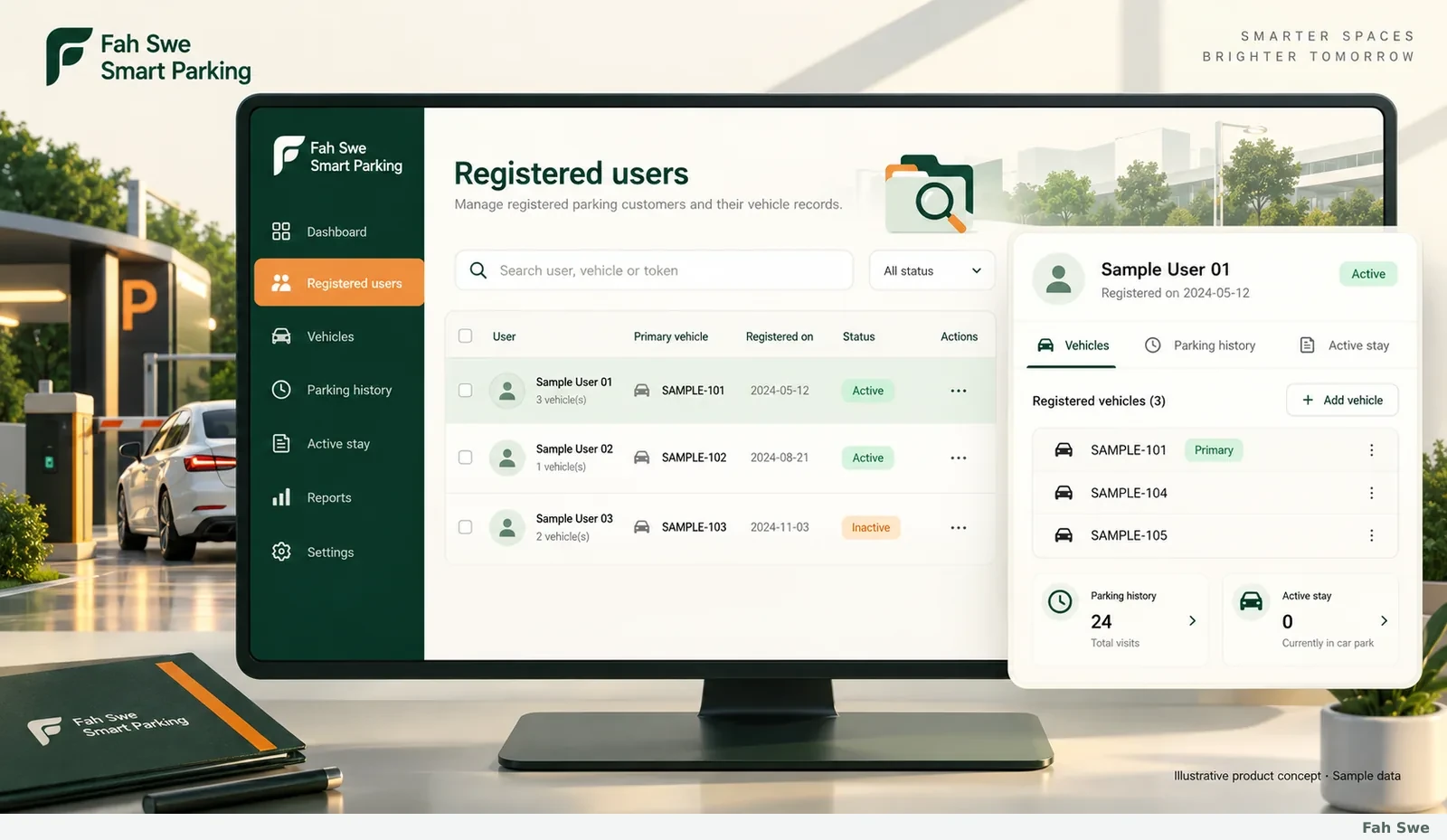
Registered users, vehicle records and search
Keep the agreed customer-registration details and vehicle identifiers in organized records. A user may have related vehicles and visit history, while the owner controls which operators can view or edit those records. Search by the identifiers relevant to the site and filter operational records by date, status, floor or token. Personal data fields, retention and exports are agreed during setup so the product collects what the facility needs rather than unnecessary documents.
How to use this screen
Register the required customer and vehicle details.
Find a record using search and filters.
Open the related vehicles or visit history within your permissions.
Business benefit
Replace disconnected registers with records the right operator can find.
10
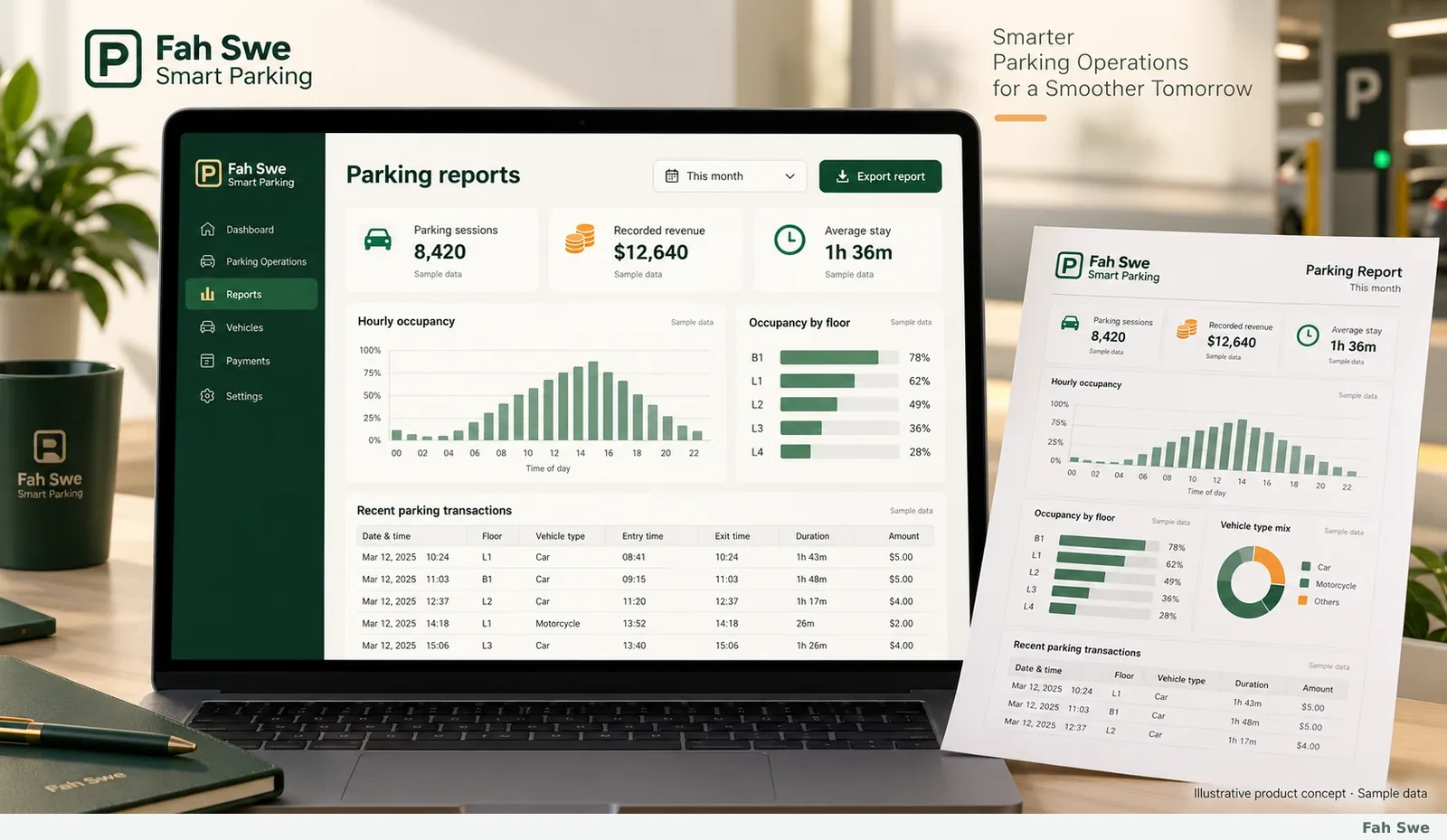
Occupancy, revenue and parking reports
Review recorded sessions, collections, average stays and occupancy by the periods and locations included in your scope. Separate current availability from historical reporting, and distinguish unpaid bills or payment records when the chosen workflow supports them. Export and print formats are agreed with the team so management can reconcile a period and follow up exceptions. Sample charts illustrate how information can be presented; they are not claimed customer revenue, utilization gains or guaranteed business results.
How to use this screen
Choose the reporting period and facility filter.
Review parking activity and received collections.
Export the agreed report for reconciliation or follow-up.
Business benefit
Give management a clear view of recorded operations instead of scattered totals.
11
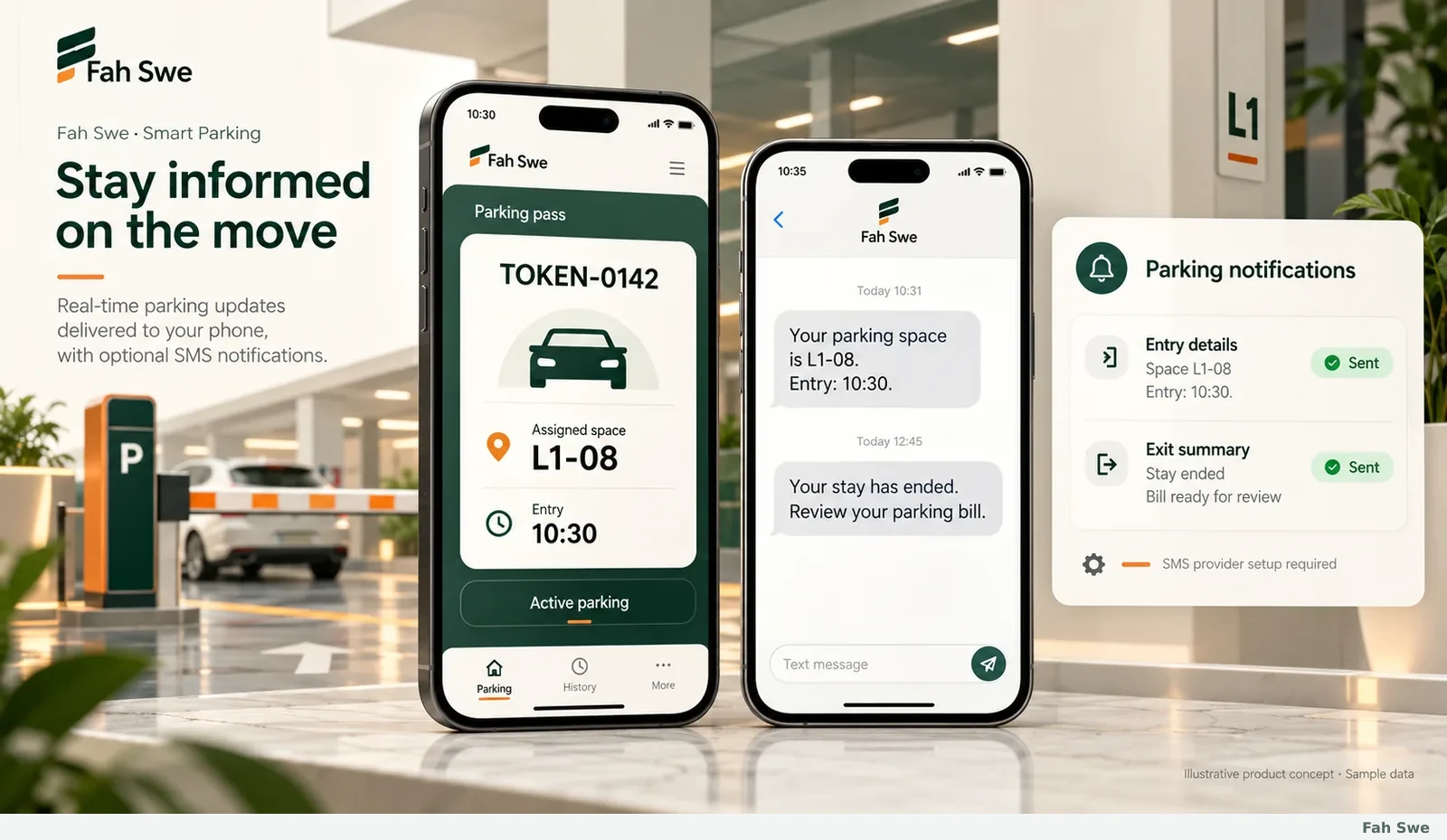
Mobile access and parking notifications
Plan mobile-friendly access for the agreed operator or customer screens. Where SMS is selected, send useful entry details, assigned space, directions or an exit/bill summary through the configured provider or compatible local gateway. Keep message content and recipient rules aligned with the real parking event. SMS service fees, sender approval, connectivity and supported devices are confirmed separately; a concept screen is not a promise of message delivery on an unconfigured service.
How to use this screen
Choose the mobile screens and notification events.
Configure the approved message service and sender.
Test entry and exit messages before going live.
Business benefit
Help customers and staff carry the relevant parking information with them.
12
Site-specific sensors, signage and provider connections
Extend the agreed software through a reviewed device and service plan. Occupancy sensors, light indicators, LED direction boards, local controllers, entry/exit meters and payment-provider APIs can be assessed against their actual interfaces. Sensor technology and links such as ultrasonic sensing, ambient-light data, Wi-Fi, ZigBee, UDP, cellular or Bluetooth are selected only where compatible and necessary. Video-based occupancy or advanced vehicle-connected systems need a separate engineering review. Physical equipment, installation and third-party subscriptions are not silently bundled with software.
How to use this screen
Share the device models, interface documents and site layout.
Agree the integration scope and equipment responsibilities.
Validate actual signals and failure handling before commissioning.
Business benefit
Choose integrations that fit the facility rather than assuming every device works.
Technical & purchase information
Technical requirements
Facility layout, floors/bay identifiers, vehicle categories, parking rules and tariffs, entry/exit workflow, operator responsibilities, hosting/on-site environment and any actual device/API documentation. Do not share secrets in the order brief.
Development scope & manual delivery
Fah Swe prepares the reviewed software scope and manually hands over the agreed parking system through the existing project workflow. Software modules, deployment, integrations, training and acceptance checks are specified in the approved quotation. Physical hardware and external service fees are separate unless explicitly included.
Support & updates
Use the existing Fah Swe client portal for project updates, handover and support tickets. Included coverage and any paid renewal follow the existing support policy and verification process.
Questions before you buy
What is Fah Swe Smart Parking?
It is a ready-to-order software development offer for multilevel parking operations, including the agreed entry/exit, spaces, tokens, records, fees and reporting workflow. Fah Swe reviews and delivers the confirmed scope through its existing client portal.
Does the software price include parking hardware?
Sensors, direction displays, meters, barriers, printers, site installation and third-party services are included only when explicitly specified in the approved quotation. Share the actual device models for a compatibility review.
Can it support reservations and more than one parking location?
Yes, those modules can be part of the agreed development scope. Availability rules, locations, provider data and reservation hold/release behaviour are confirmed before implementation.
How are parking bills and payments handled?
The agreed tariff uses the recorded stay and vehicle category. Original charges, allowed discounts, the final bill and actual collections stay separate. Payment gateway or bank verification requires its own configured integration.
Will SMS work immediately without a provider?
No. SMS needs a configured provider or compatible local gateway, approved sender and available service. Provider fees and message events are confirmed during setup.
Can I use full payment or apply for installments?
Use the existing Fah Swe full-payment or loan/installment options after scope review and approval. The existing eligibility, KYC, contract and payment-verification requirements still apply.
Can I save my requirements and finish later?
Yes. The existing New Development form supports account-protected device drafts and an explicit Save draft action. Complete the company details requested by the portal before submitting.
Are the pictures screenshots of an installed customer system?
They are original Fah Swe illustrative product concepts with sample data. They explain the intended workflows. The final design, deployment and integrated equipment follow the approved project scope.
What hosting or desktop information should I provide?
Tell Fah Swe your preferred web, on-site desktop or mobile-access arrangement and whether you already have hosting or a domain. Share site/device requirements, not passwords or secret API keys in an order brief.
How are delivery and support arranged?
Fah Swe confirms the scope, required information and delivery plan before work. Progress, handover and support use the existing portal. Hardware commissioning and extra services are included only where agreed.