
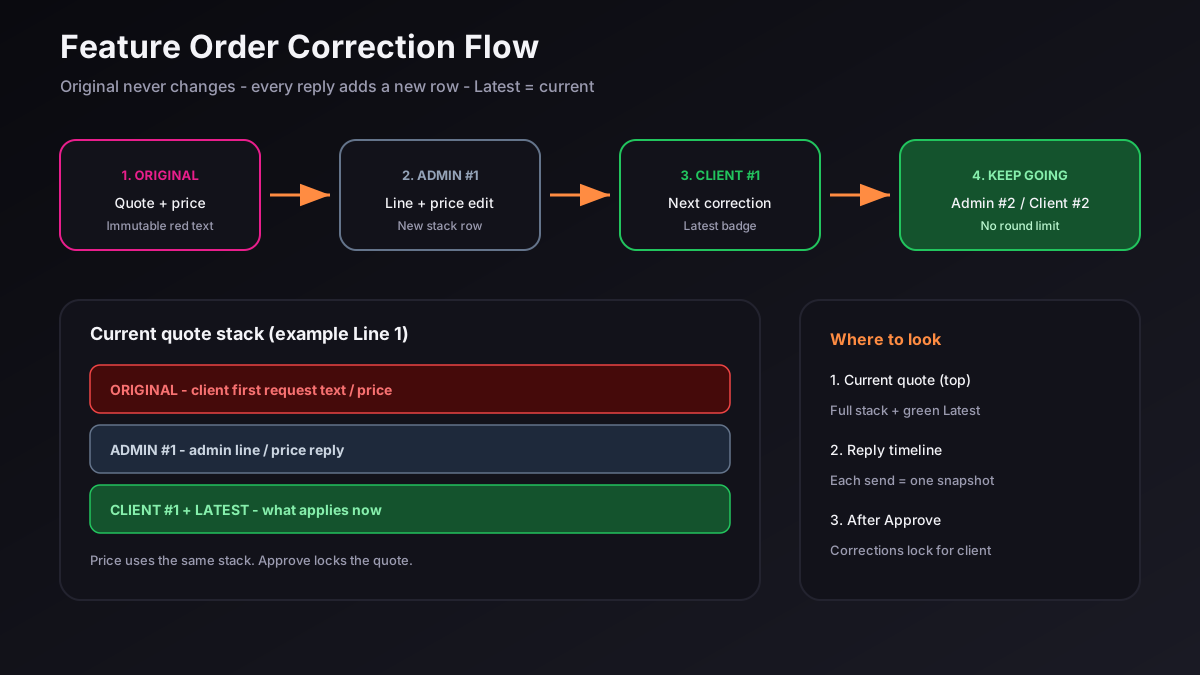
Feature Orders on Fah Swe let you request product changes after admin quotes your work. Corrections never overwrite the original quote text. Every reply adds a new row under that line so you always see history and the current (Latest) text and price.
Open correction docs
From Client Dashboard → Feature Orders, open your order and tap Correction docs (or the correction link in your notification). You will see the Current quote at the top — this is the live document.
Read the stack (Original → Admin → Client)
Under each feature and Line N you may see stacked cards: ORIGINAL (red) never changes. ADMIN #1, CLIENT #1, ADMIN #2… each add a new row. The green Latest badge marks what applies now. There is no round limit until the quote is Approved.
How to send your correction
Tap + (Request correction). Check the feature you want to change. Type your next text only in the Line N field — do not paste a brand-new feature as if replacing the whole card. Optionally set Corrected price in the green pill. Add a short note if needed, then send.
Important: a note alone does not create a Line or Price row. Fill Line N and/or Corrected price so your change appears in the stack.
Where is my correction?
Always look at Current quote · all corrections at the top. The Reply timeline below is only a history of each send (snapshots). An older Admin card is not the final answer if a newer Client card exists — use the green Latest on the top document.
Prices
Price uses the same stacking: ORIGINAL amount → each Admin/Client suggested amount. Latest quote total at the bottom of the quote updates when admin confirms prices.
After Approve
When admin Approves, the quote locks. Clients can no longer send corrections. Locked text and prices move into the project overview for delivery.
Tips for clear corrections
Correct one line at a time. Keep Bangla or English clear. Attach Drive links inside the line text if you need video references. Reply within a few days so the quote stays active.
Need help? Open a ticket in the portal or email info@fahswe.com — Fah Swe (fahswe.com), software company in Bangladesh.